


Kasa Smart
4.738.14K Reviews
App Specs
- Version
- 3.4.602
- Updated On
- License
- Free
- Downloads
- 5,000,000+
- Developer
- TP-LINK SYSTEMS INC.
- Categories
- Lifestyle
- Platform
- Android, iOS
Screenshots
 Analysis by AppCompare
I find a smart-home app most useful when it makes a small, repeated task easier without turning every light or appliance into another project to manage. Kasa Smart is TP-LINK SYSTEMS INC.’s lifestyle app for controlling compatible TP-Link home devices from a phone. It is free, rated for Everyone, and has a 4.7 average from around 142,000 ratings, with over 5 million installs. Those figures suggest a well-used option, but the more important question is whether its everyday flow suits the way you want to run your home.
Start with the task, not the gadget
Before installing a smart-home app, I’d decide what I actually want to change: switching off a lamp from bed, checking a connected camera, or making several familiar actions happen together. That simple starting point matters because adding devices without a routine can leave you with more menus and very little extra convenience. Kasa is a natural fit if your home already uses compatible TP-Link products, or if you plan to build around them gradually.
The app is free, so trying it does not require a purchase of the app itself. The devices you want to control are a separate part of the decision: the experience depends on having compatible hardware, a working home network, and a phone that meets the listed minimum operating-system requirement of 7.0. I’d check that the particular device I’m considering works with the Kasa app before buying it, rather than assuming every smart plug, camera, light, or other connected product can be added.
Getting Started with Kasa Smart
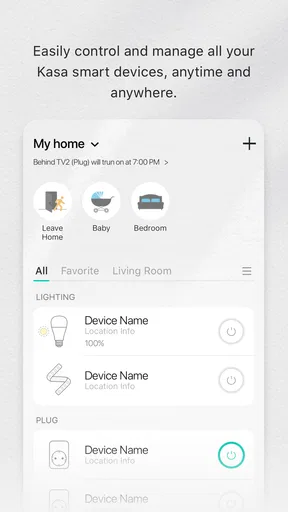
First things first, setting up Kasa Smart is a breeze. After installing the app, you’re greeted with a clean and intuitive interface. You just need to create an account or log in, and you’re ready to sync your devices. The app supports a range of devices from smart plugs to cameras, making it a one-stop shop for all your smart home needs.
Moving from setup to a useful routine
Once a compatible device is connected, I’d give it a name that makes sense when I’m in a hurry. “Living room lamp” is easier to identify than a room label or a model name, especially when several devices appear in the same list or I’m using a voice command. It is a small setup choice, but it prevents a common smart-home nuisance: controlling the wrong thing because the labels only made sense on installation day.
For a first test, I’d keep the workflow simple. Add one device, check that I can switch it on and off from the app, then try the same action from the place where I’ll normally need it. A smart plug behind a hard-to-reach lamp is a more convincing test than automating an entire room at once. If that basic handoff between app and device feels dependable, it is easier to decide whether another device or a scene would genuinely help.
Features That Stand Out
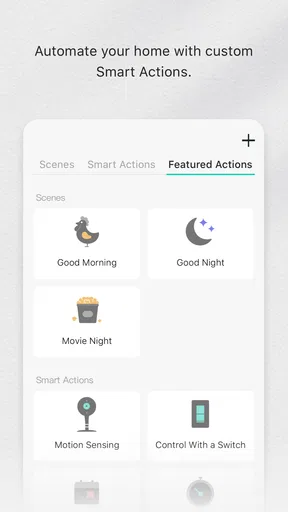
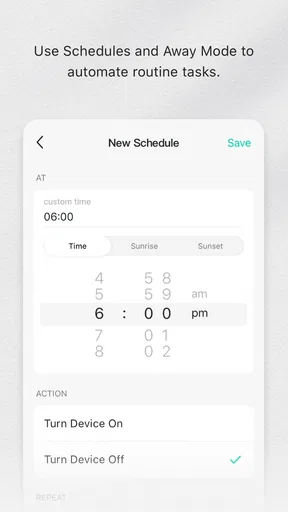
One of the coolest features is the ability to create "Scenes." Imagine setting a mood with a simple tap—turning on the lights, adjusting the thermostat, and even playing some smooth jazz in the background. With Kasa Smart, you can do just that. The app allows you to customize these scenes to fit your daily routines, like a "Goodnight" scene that shuts everything down for the night.
Worth Reading Before You Choose

EA SPORTS FC Mobile 26 Is a Bigger Football Game, but It Takes Time

Flipboard Shows What News Apps Must Do Beyond the Feed

Switching to Android Auto Means Rethinking Your Driving Routine

Google Calendar Makes a Crowded Week Easier to Manage

Ludo King Makes the Most of the Minutes Between Plans

Baby Panda World Brings Quick Play to Modern Phones, but Its Game Library Feels Busy
I’d treat scenes as shortcuts for actions I already repeat, not as a reason to automate every possible combination. A bedtime scene is useful if it brings together compatible devices I routinely want to switch off or adjust; it is less helpful if I have to remember which devices it includes or keep editing it as my habits change. It is also worth testing a scene while you are nearby the first few times. That makes it easier to notice an overlooked lamp or an action that does not produce the result you expected.
A practical weekday example is arriving home with shopping in both hands. If a compatible light is already set up, switching it on from the phone can save a trip to a dark room’s wall switch. Later, a scene can bundle the familiar end-of-day actions into one tap. The benefit is not that the home becomes autonomous; it is that the app can reduce a few small interruptions when its setup matches the routine.
Handing control to voice assistants
Another standout feature is the integration with voice assistants like Alexa and Google Assistant. I tried it with my Alexa device, and I’ve got to say, it felt like living in the future. "Alexa, turn on the living room lights," and boom, it’s done. No more fumbling in the dark or getting up from your cozy couch.
Voice control is a useful alternative when the phone is out of reach, but it is another handoff to set up and maintain: the device needs a clear name, the assistant needs to understand it, and the requested action still depends on the connected equipment and network. I’d keep names distinct and commands short, especially if several lights have similar labels. If a voice request fails, using the app directly is a sensible way to work out whether the issue is the command or the device connection.
This is one area where the choice between app control and a broader smart-home platform matters. Kasa’s appeal is straightforward control for compatible TP-Link devices, while a household mixing products from many manufacturers may prefer to make a broader platform its main control point. I would not choose a setup based only on a voice assistant connection; I’d first consider which devices I want to use and whether I’m comfortable managing them through their respective systems.
User Experience
The user experience is top-notch. The app is responsive and doesn’t lag, which is crucial when you’re trying to control your home efficiently. Navigating through the different sections is a walk in the park, thanks to the well-organized layout. I especially appreciate the "Activity" section, which provides a log of all the actions you’ve taken. It’s like having a personal assistant keeping track of everything.
An activity log is most useful when something happens and you want to reconstruct the sequence, rather than as a screen to check constantly. If a device seems to have changed unexpectedly, reviewing recent activity can help you see what was triggered through the app. I’d use that record as a troubleshooting aid, not as proof that a device has completed a physical task: a control action being recorded and the real-world result are not quite the same thing.
For households where more than one person uses the devices, it helps to agree on a naming scheme and a few shared routines before the setup grows. Clear labels make the app easier to navigate and also help voice commands stay predictable. A short list of the actions that matter—such as a shared lights-off routine—can be more useful than building a complicated arrangement that only one person remembers how to operate.
Where the workflow can break
Now, let’s talk security. With all these smart devices, it’s natural to worry about privacy. Kasa Smart ensures that your data is secured with high-end encryption, which is a huge relief. In my experience, the app has been incredibly reliable. I haven’t encountered any major bugs or crashes, which is a big plus in my book.
The practical limit I would plan around is the network. The app relies on a stable internet connection, so an outage can interrupt the smooth control you expect from a connected home. If switching a device from the phone is essential in a particular moment, keep its normal physical control available where possible rather than making the app the only route. Smart-home convenience works best as an extra way to operate a device, not a reason to remove the simple fallback.
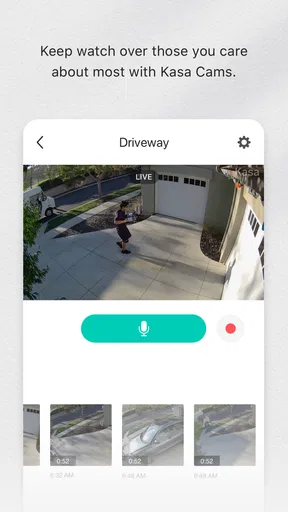
Security is also more than a single app setting. I’d keep the phone and account access under control, use sensible account practices, and think carefully before placing a connected camera in a private space. The app may make device management easier, but choosing where a camera belongs and who can access the account remains a household decision. For someone who wants to avoid connected cameras or accounts altogether, a conventional device may be a better fit.
Who benefits most from this approach?
I’d recommend the app to someone who owns compatible TP-Link devices and wants a clear place to control them, especially if the main goal is a few practical routines rather than an elaborate smart-home system. It can suit a renter or homeowner who wants to start with one lamp or plug and expand only when a real need appears. The low-friction path is to begin with one device, learn the app’s controls, and add scenes or voice control only after the basic setup feels worthwhile.
It is less compelling if your devices come from a wide mix of brands and you want one unified control system above all else. In that case, a platform designed to coordinate a broader range of manufacturers may be a better starting point, though the exact compatibility still needs checking for each product. It is also not the right choice for someone who expects smart controls to work regardless of network conditions, or who would rather not manage accounts and connected equipment at all.
The app’s current version is 3.4.507, and it first appeared on November 7, 2015. I would not treat a version number by itself as a guarantee that every device behaves identically; the hardware model, phone, and home network all shape the experience. If something fails during setup, I’d first check the device’s compatibility and the network connection, then retry the control in the app before assuming a scene or voice link is at fault.
What the finished setup feels like
When the pieces are chosen carefully, the result is less about controlling a home from anywhere and more about removing little points of friction: turning on a lamp without crossing the room, grouping familiar actions, or using a voice command when your hands are full. I like that these benefits can be built in steps. A single useful device is a reasonable endpoint; there is no need to keep expanding just because the app can manage more.
Compared with using a separate app for each compatible device, Kasa gives TP-Link users a more coherent place to manage their setup. Compared with a broad smart-home hub or a mixed-brand platform, its strength is a more focused relationship with TP-Link hardware, while its trade-off is that it may not be the best central choice for a varied collection of devices. That distinction is worth thinking through before buying more equipment, because the app is only as convenient as the system you build around it.
Conclusion: Is Kasa Smart Worth It?
In conclusion, if you’re looking to dip your toes into the smart home world or even expand your existing setup, Kasa Smart is a solid choice. It’s user-friendly, packed with features, and offers peace of mind with its security measures. The app brings convenience and a touch of luxury to your daily life, all from the palm of your hand. So, are you ready to make your home a little smarter?
Pros
- User-friendly interface with intuitive controls.
- Seamless integration with Alexa and Google Assistant.
- Customizable automation schedules for devices.
- Reliable performance with minimal connectivity issues.
- Energy monitoring features for smart consumption.
Cons
- Limited compatibility with some smart devices.
- Occasional lag in app response time.
- Requires stable internet for optimal use.
- No support for Apple HomeKit integration.
- Initial setup can be slightly complicated.
FAQs for Kasa Smart
What is Kasa Smart, and how does it work?
Kasa Smart is a home automation app that allows you to control smart devices like lights, cameras, and plugs directly from your smartphone. By connecting these devices to your home Wi-Fi network and using the Kasa Smart app, you can manage your home environment through scheduling, remote access, and automation features.
Is Kasa Smart compatible with other smart home systems?
Yes, Kasa Smart is compatible with popular smart home platforms such as Amazon Alexa and Google Assistant. This integration allows you to use voice commands to control your devices. However, it's important to check the compatibility of each specific device, as not all may support every platform.
Do I need any additional hardware to use Kasa Smart?
To use Kasa Smart, you need compatible Kasa devices like smart plugs, bulbs, or cameras. No additional hub is required, as these devices connect directly to your Wi-Fi network. Simply ensure that your devices are Wi-Fi enabled and compatible with the Kasa Smart app for seamless integration.
How secure is the Kasa Smart app?
Kasa Smart prioritizes user security by using encryption to protect data transmitted between devices and the app. It's essential to regularly update the app and your devices to the latest firmware to ensure you have the most recent security patches. Always use strong, unique passwords for added protection.
Can I control my devices when I'm not at home?
Yes, with the Kasa Smart app, you can control your devices remotely as long as you have an internet connection. This feature allows you to manage your home environment from anywhere, providing convenience and peace of mind whether you’re at work, on vacation, or just out running errands.


